Structured Cabling for New Construction
What to wire before drywall so the network, AV, security, and control systems can evolve for years.
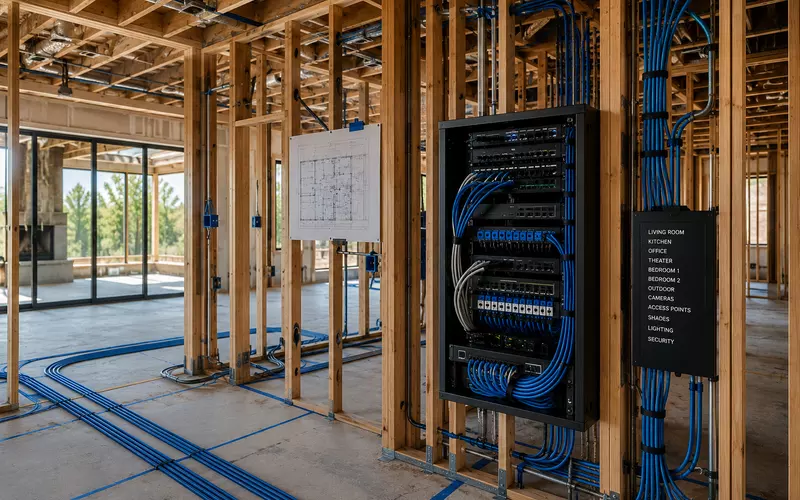
Few construction decisions affect a home’s technology for as long as structured cabling. Electronics change every few years, but cable inside the walls may support the property for decades.
Once drywall is installed, new pathways become more expensive and disruptive. Planning the low-voltage infrastructure while framing is open preserves options for networking, Wi-Fi, AV, security, lighting, automation, shades, access control, outdoor systems, and technologies that do not yet exist.
What Is Structured Cabling?
Structured cabling is an organized system of low-voltage wiring connecting technology throughout a building. Instead of wiring only for today’s equipment, it creates a flexible physical foundation for home networking, access points, televisions, audio, theaters, cameras, alarms, lighting, shades, HVAC controls, automation, and outdoor entertainment.
It provides the pathways that allow connected systems to operate reliably, even as the equipment at each end changes.
Plan Before Construction Begins
The ideal time to design the system is during the architectural phase. Early involvement lets homeowners, architects, builders, electricians, HVAC contractors, designers, cabinet teams, security specialists, landscape designers, and AV integrators coordinate equipment and routes before choices disappear.
Every room should be evaluated around likely use—including living areas, bedrooms, offices, theaters, kitchens, fitness rooms, garages, patios, outdoor kitchens, pools, and guest houses. A room does not need immediate equipment to deserve a future pathway.
The Equipment Room and Home-Run Wiring
A centralized equipment location may contain internet service equipment, switches, patch panels, automation controllers, audio distribution, security hardware, UPS backup, fiber termination, and rack-mounted components. It needs ventilation, power, lighting, physical security, service clearance, and space for expansion.
Professional systems generally use a home-run topology: every cable travels directly from the equipment room to its endpoint. Home runs improve troubleshooting, performance, upgrades, documentation, and reliability. Daisy-chaining rooms may save cable initially but restricts future choices.
Ethernet Is the Foundation—and Wi-Fi Still Needs Wires
Typical Ethernet destinations include televisions, streamers, gaming systems, offices, wireless access points, cameras, touch panels, AV equipment, switches, and automation controllers. Fixed devices benefit from wired performance even when they also support wireless connections.
Professional Wi-Fi systems use wired ceiling or wall access points. Ethernet enables predictable coverage, faster speeds, lower latency, reliable roaming, Power over Ethernet, and easier future upgrades. The wireless experience begins with the wired network.
Television, Theater, and Speaker Wiring
Television locations often require Ethernet, conduit, audio or control wiring, fiber where appropriate, and coordinated power. Feature walls should account for future display sizes and service access, not only the television selected during construction.
A dedicated home theater may need projector pathways, speaker and subwoofer cables, control wiring, HDMI or fiber transport, acoustic coordination, rack connections, network drops, and spare conduit. Whole-home audio wiring should also consider kitchens, dining rooms, bedrooms, bathrooms, patios, and pool areas even when speakers will be added later.
Security, Doorbells, Shades, and Lighting
Wired PoE cameras at doors, driveways, yards, garages, pools, and detached buildings provide stable power and connectivity. Video doorbells also require attention to power, chimes, network needs, viewing angles, and future replacement.
Motorized shades require early coordination of power, low-voltage wiring, pockets, side channels, window details, and service access. Lighting control may add keypad wiring, centralized panels, occupancy sensors, and daylight sensors coordinated with furniture plans and room functions.
Home Offices and Outdoor Infrastructure
Home offices should typically have multiple Ethernet connections, strong Wi-Fi, UPS support, printer and conferencing connectivity, and expansion capacity. One network cable can become limiting quickly.
Beyond the walls, wiring may support landscape lighting, speakers, televisions, cameras, pool equipment, gates, Wi-Fi, irrigation monitoring, and weather sensors. Conduit to outdoor areas, garages, and guest houses keeps later additions practical.
Conduit, Fiber, and Expansion
Empty conduit is inexpensive insurance. High-value pathways connect the equipment room with attics, basements, crawlspaces, display and projector locations, exterior walls, offices, and detached structures. New cable types can then be installed without damaging finished construction.
Ethernet serves most residential needs today, while fiber can be valuable for long runs, detached buildings, equipment-room links, high-performance AV transport, and future bandwidth. Leave spare conduits, rack units, patch-panel positions, Ethernet drops, and electrical capacity wherever practical.
Label, Document, and Test Before Drywall
Every cable should be labeled at both ends with its room, device location, cable number, and rack destination. Professional documentation should include cable schedules, rack elevations, patch-panel layouts, equipment lists, network diagrams, conduit routes, device locations, and photographs captured before walls close.
Test continuity, termination, cable performance, labels, fiber, and speaker polarity before insulation and drywall. Damage that takes minutes to correct during framing can become a costly finished-home repair.
Common Structured-Cabling Mistakes
- Too few Ethernet runs
- Depending entirely on Wi-Fi
- No dedicated equipment room
- Poor or missing cable labels
- No future conduit
- Equipment placed in hot closets
- No drawings or photographs
- Sharp bends or improper routing
- Low voltage too close to power
- Insufficient service access
- No rack or panel expansion capacity
Most of these failures cost little to prevent while construction is open. A professional structured-cabling partner coordinates architecture, rack design, networking, security, AV, controls, documentation, and commissioning around the complete property—not simply a list of cable pulls.
Frequently Asked Questions
What is structured cabling?
Structured cabling is a planned system of low-voltage wiring that supports networking, AV, security, automation, and future technology throughout a home or building.
Why should structured cabling be installed before drywall?
Open framing makes cable routes accessible. After drywall, adding wiring becomes more disruptive, expensive, and limited by finished construction.
How many Ethernet cables should each room have?
The number depends on room use, but professional plans commonly provide multiple runs wherever televisions, computers, access points, controls, or future devices may be installed.
Is Wi-Fi enough without Ethernet?
No. Professional Wi-Fi relies on wired access points, and fixed devices often perform more reliably over Ethernet.
What is home-run wiring?
Every cable runs directly from its destination back to the central equipment room, improving troubleshooting, flexibility, documentation, and reliability.
Should I install conduit?
Yes. Empty conduit allows future cable types to be added without opening finished walls and is one of the most valuable forms of future-proofing.
Should security cameras be wired?
Usually. Wired PoE cameras receive stable power and network connectivity through one cable and avoid the compromises of battery or Wi-Fi-only designs.
Where should the equipment rack be located?
Use a secure, ventilated, accessible space with adequate power, lighting, service clearance, and expansion room—not a hot mechanical space or clothing closet.
Is fiber necessary in a home?
Ethernet meets most current residential needs, but fiber can be valuable for detached buildings, long runs, AV transport, and future bandwidth growth.
Should speaker wiring be installed before speakers are purchased?
Often, yes. Prewiring preserves future options at comparatively low cost while framing is open.
How should cables be documented?
Documentation should include labels at both ends, cable schedules, rack layouts, device locations, network diagrams, conduit routes, and pre-drywall photographs.
When should the low-voltage contractor become involved?
Ideally during architectural design, before framing, electrical, HVAC, cabinetry, lighting, and interior details constrain the technology plan.
Can structured cabling increase a home's value?
Market value varies, but professional infrastructure makes a property more adaptable, serviceable, and attractive to buyers who expect reliable connected systems.
Build the Technology Foundation Before the Walls Close
Structured cabling continues providing value long after construction ends. A thoughtful system can support multiple generations of networking, entertainment, security, lighting, automation, and future technology.
AVgator designs and installs structured infrastructure for Charlotte custom homes, renovations, luxury residences, and commercial properties. Schedule a cabling consultation before drywall to preserve the best options.