Smart Home Security: The Complete Guide
A layered approach to access, intrusion detection, surveillance, lighting, and reliable remote awareness.
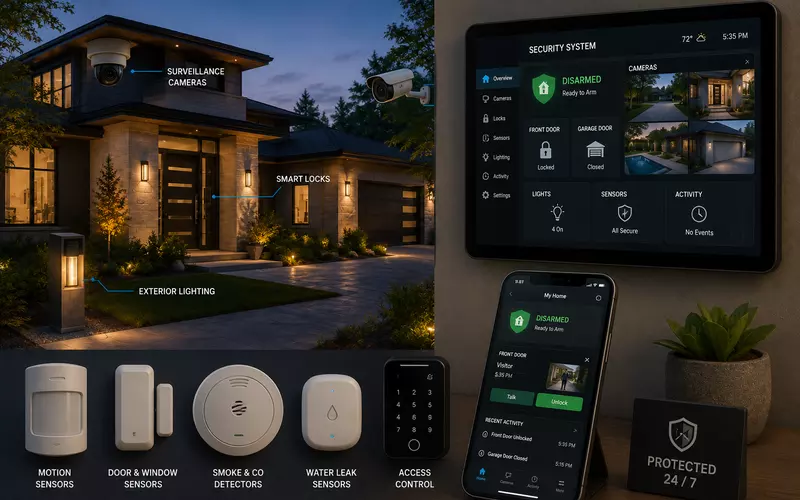
Modern smart-home security combines intrusion detection, access control, surveillance, lighting, networking, automation, and remote awareness into one coordinated system. Its purpose is not only to report an incident, but to discourage unwanted activity, simplify trusted access, and provide clear information when something unexpected happens.
That requires more than cameras and a video doorbell. Property layout, illumination, sensor and camera placement, user permissions, cybersecurity, backup power, and everyday workflows all determine whether a system is genuinely dependable.
Think in Layers, Not Devices
Effective protection uses several overlapping layers: property awareness, exterior lighting, cameras, access control, door and window protection, intrusion detection, interior and environmental monitoring, automation, network security, remote monitoring, and backup power.
If one layer is bypassed or unavailable, another continues providing information or protection. Good design reduces risk rather than depending on one impressive device.
Start with the Property and Its Perimeter
Planning begins with home and lot size, landscaping, driveways, windows, entries, gates, fences, detached garages, guest houses, pools, and outdoor living spaces. Understanding natural approach paths informs the camera, lighting, and access strategy.
Perimeter protection can include driveway awareness, gates, motion detection, exterior and landscape lighting, outdoor cameras, smart locks, doorbells, and controlled fence access. The objective is to improve awareness before someone reaches the house.
Smart Locks, Access Control, and Video Doorbells
Modern access systems can provide PINs, mobile or biometric credentials, temporary and scheduled guest access, remote locking, and audit history. Homeowners can give family, guests, contractors, housekeepers, delivery services, or property managers the access each one needs without distributing permanent keys.
Video doorbells add live video, two-way communication, motion alerts, visitor history, package awareness, and remote answering. They are useful at a primary entrance but should remain one component of a broader plan, especially on large properties.
Security Cameras and Purposeful Placement
Common camera locations include entrances, rear doors, driveways, garages, side yards, pools, kitchens, walkways, gates, and detached buildings. Placement matters more than headline resolution: a camera mounted too high or aimed into strong sun may fail to identify a face.
Each camera should have a defined job. Identification cameras capture faces at entries; observation cameras cover larger areas; specialized views may capture vehicles or license plates; overview cameras provide general awareness. These tasks require different lenses, heights, angles, and fields of view.
Night performance
Useful nighttime images depend on camera sensor and lens quality, mounting, motion blur, reflections, architectural and landscape lighting, and vehicle headlights—not only built-in infrared. Balanced exterior lighting often produces better footage and improves deterrence at the same time.
Recording Strategy: Local, Cloud, or Both
Continuous, motion, smart-event, scheduled, and hybrid recording each have a role. Critical entrances may warrant continuous capture while less active areas record on meaningful events. Storage capacity, camera count, image settings, retention goals, and property size should guide the design.
Local recording offers high capacity, fast playback, and continued operation during internet outages. Cloud storage provides off-site protection and convenient remote access. A hybrid strategy can preserve the strengths of both.
Intrusion and Environmental Detection
Door and window contacts, glass-break detectors, motion sensors, shock sensors, garage-door monitoring, and interior occupancy devices provide different kinds of evidence. Window contacts detect opening; glass-break sensors address broken fixed or operable glazing. Sensor selection should fit the architecture rather than maximize quantity.
Motion placement must consider pets, sunlight, windows, HVAC airflow, ceiling height, furniture, and stairs to avoid nuisance alarms. Environmental sensors can also detect smoke, carbon monoxide, water leaks, freezing or high temperatures, humidity, and power failures—often preventing more property damage than intrusion devices.
Lighting, Smart-Home Scenes, and Useful Notifications
Exterior, pathway, entry, driveway, landscape, and vacation lighting can discourage activity while helping cameras see. Lighting should improve visibility without glare or unnecessary impact on neighbors.
Away can lock doors, close garages, adjust HVAC and shades, turn off selected lights, arm the alarm, and change camera behavior. Arrival can disarm for an authorized credential and activate entry and pathway lighting. Vacation mode may use varied lighting, scheduled shades, temporary codes, increased recording, and stronger alerts.
Notification design should prioritize actionable events—alarm or smoke activity, unknown visitors, significant door events, leaks, a garage left open, offline cameras, and system faults. Too many low-value alerts create fatigue and reduce the chance that important ones receive attention.
Cybersecurity, Networking, and Backup Power
Every connected security device is also a network endpoint. Strong unique credentials, multi-factor authentication, encryption, firmware management, segmentation, secure remote access, device inventory, and role-based permissions are part of the physical-security design.
Professional installations often use structured cabling, wired PoE cameras, managed switches, secure Wi-Fi, and backup internet where risk justifies it. Critical systems should not depend entirely on consumer wireless networking.
Battery and UPS capacity can keep selected alarm panels, cameras, switches, door controllers, recorders, and internet equipment operating during outages. Backup duration should follow the owner's expectations and the property's risk profile.
Privacy, Equipment Choice, and Future Expansion
Camera placement, interior monitoring, audio-recording laws, guest awareness, data retention, and user permissions require deliberate privacy decisions. Interior cameras should serve a clearly defined purpose.
Professional equipment generally prioritizes continuous operation, low-light performance, centralized management, serviceability, expandability, integration, and longer product support. Future-ready plans include spare switch capacity, camera pathways, conduit, alarm inputs, storage, rack space, and current documentation.
Documentation, Commissioning, and Maintenance
The owner should receive camera and sensor schedules, network and wiring diagrams, user permissions, credential procedures, equipment lists, warranty information, and backup records.
Commissioning verifies focus and fields of view, nighttime performance, recording and retention, sensors, notifications, remote access, automation scenes, network recovery, and backup power under real conditions.
Ongoing service includes firmware updates, battery replacement, camera and lens cleaning, storage checks, sensor tests, user and password review, and backup verification. A complex system that is never reviewed will gradually become less dependable.
Common Smart-Home Security Mistakes
- Buying devices before defining security risks and goals
- Mounting cameras too high or ignoring lighting and night testing
- Using Wi-Fi for every endpoint
- Generating excessive, low-value notifications
- Using weak credentials or ignoring cybersecurity
- Providing no backup power or offline plan
- Skipping documentation, commissioning, and maintenance
The strongest system explains what is happening, where it is happening, and what action is appropriate—while remaining simple enough that homeowners use it correctly every day.
Working with an Integration Partner
Residential security intersects networking, electrical infrastructure, lighting, architecture, automation, privacy, and user experience. An integration partner can assess risks, design camera views, plan cabling and backup power, configure access, program scenes, commission the system, train users, and maintain it over time.
Explore AVgator's security and surveillance services and professional networking services.
Frequently Asked Questions
What is a smart home security system?
It combines intrusion detection, surveillance, access control, lighting, networking, automation, and remote monitoring into a coordinated platform that improves awareness and protection.
Are security cameras enough to protect a home?
No. Cameras are one layer. Effective protection also includes locks, intrusion sensors, lighting, access control, cybersecurity, and reliable networking.
How many security cameras does a typical home need?
The number depends on property size, layout, and goals. Good designs cover important entries, driveways, outdoor living areas, garages, and other high-priority locations rather than maximizing camera count.
Should security cameras record continuously?
Not always. Critical areas may benefit from continuous recording, while others can use motion or event recording. Many systems combine methods by camera.
Is local recording better than cloud storage?
Each has advantages. Local recording offers capacity and outage resilience; cloud storage provides off-site protection and convenient remote access. Professional systems often combine both.
Can smart locks replace traditional keys?
Yes. They can provide PINs, mobile credentials, temporary and scheduled access, and audit logs while retaining physical keys where appropriate.
Can smart home security work without internet?
Core alarms and local recording can continue during internet outages when properly designed. Remote access and cloud services may be temporarily unavailable.
Are wireless security cameras reliable?
They can suit some installations, but professional systems often prefer wired PoE cameras for reliability, bandwidth, centralized power, and simpler maintenance.
How does lighting improve security?
Exterior lighting improves visibility, discourages unwanted activity, and helps cameras capture better images. Automation can also simulate occupancy while homeowners are away.
Should cameras be installed inside the home?
Interior cameras may serve selected purposes, but privacy should guide placement. Many homeowners prefer exterior cameras with intrusion sensors indoors.
Can the security system detect water leaks or smoke?
Yes. Modern systems can integrate smoke, carbon monoxide, water-leak, freeze, temperature, humidity, and power-failure monitoring.
How long should security footage be stored?
Retention depends on storage, resolution, frame rate, recording method, camera count, and homeowner requirements. Capacity should be designed around a clear retention target.
What happens during a power outage?
Backup batteries or UPS units can keep selected alarm, camera, network, recording, and access equipment operating for a defined period.
Is smart home security vulnerable to hackers?
Connected systems require proper cybersecurity. Strong authentication, encryption, updates, secure networks, permissions, and user management substantially reduce risk.
Can security systems integrate with home automation?
Yes. They can coordinate lighting, shades, HVAC, garage doors, AV, locks, and occupancy scenes to create useful arrival, departure, and vacation workflows.
Should security planning begin during construction?
Yes. Early planning allows cabling, power, camera positions, lighting, networks, and equipment spaces to be integrated before walls are finished.
Can an existing home be upgraded?
Yes. Existing homes can add cameras, smart locks, sensors, network improvements, and automation while preserving suitable portions of current infrastructure.
How often should a security system be serviced?
Annual inspection is a useful baseline, with more frequent reviews for complex systems. Service should cover updates, batteries, camera cleaning, storage, sensors, backups, and user access.
A Security System Built in Layers
Effective smart-home security combines surveillance, access control, intrusion and environmental detection, lighting, networks, automation, and dependable remote awareness. Its strength comes from thoughtful planning, resilient infrastructure, careful integration, and regular maintenance—not simply more devices.
AVgator designs comprehensive residential security systems for Charlotte-area properties and beyond. Schedule a security consultation.