What Belongs in a Residential Network Rack?
The core, power, cooling, labeling, and service-access decisions behind a maintainable technology room.
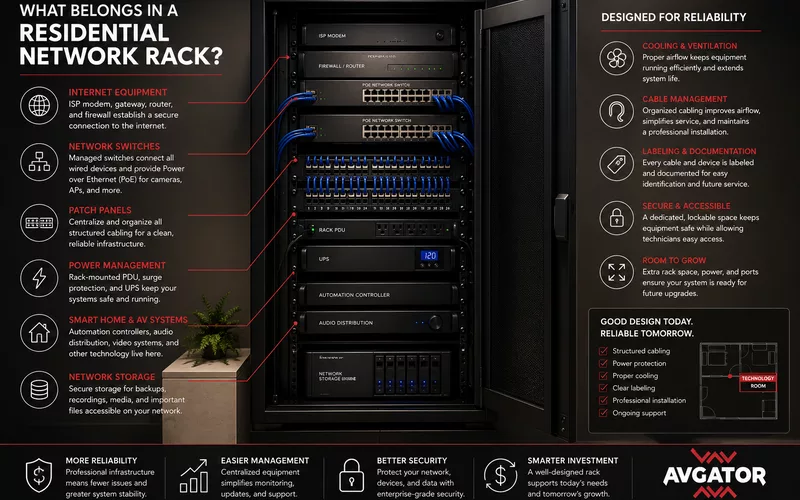
A residential network rack is the physical foundation for reliable internet, Wi-Fi, security, automation, audio, and video.
AVgator designs technology rooms as maintainable infrastructure, with clear organization, protected power, cooling, labeling, documentation, and space for future systems.
Why Centralize Technology?
Centralizing equipment improves cooling, power protection, cable organization, troubleshooting, remote management, and future upgrades compared with devices scattered through closets and cabinets.
Core Network Equipment
Internet gateway and router
The gateway connects the property to its internet service; the router manages traffic, security policies, addressing, and remote access.
Managed switches
Switches connect wired devices and can provide VLANs, monitoring, redundancy, and Power over Ethernet for access points, cameras, touch panels, and controls.
Patch panels
Patch panels terminate permanent building cable so equipment can be changed without disturbing structured wiring.
Power, UPS, and Distribution
Dedicated circuits, rack power distribution, surge protection, grounding, load calculations, and an appropriately sized UPS protect equipment and keep selected networks, cameras, automation, and communications operating through supported outages.
Cooling and Ventilation
Switches, gateways, recorders, amplifiers, controllers, and UPS units generate continuous heat. Rack spacing, ventilation, active exhaust, conditioned air, and temperature monitoring improve reliability and equipment life.
Cable Management and Labeling
- Horizontal and vertical managers
- Supported pathways and correct bend radius
- Short, organized patch cables
- Labels showing room, destination, device, and port
- Consistent equipment and outlet naming
Leave Space for Growth
A rack filled on day one cannot absorb future cameras, switches, automation, storage, or AV. Reserving roughly 20–30% of rack units, switch ports, electrical capacity, and pathway space provides useful flexibility.
Plan for Service Access
Technicians need safe front and rear access to open doors, replace hardware, test cabling, clean ventilation, and route new connections. Cramped finished cabinets make routine work slow and risky.
Integrating the Smart Home
- Automation controllers
- Audio and video distribution
- Security recorders and access control
- Lighting-control processors
- Network-attached storage
- Remote monitoring and management
Documentation Completes the Installation
- Rack elevation drawings
- Cable and port schedules
- Network and VLAN diagrams
- IP addressing plans
- Equipment inventory and warranties
- Power calculations
- Configuration backups and service notes
Common Rack Mistakes
- No patch panels
- Poor cable organization or labeling
- Insufficient cooling
- No UPS protection
- Consumer-grade networking hardware
- No documentation
- Limited service access
- No expansion allowance
Frequently Asked Questions
What is a residential network rack?
A centralized enclosure for networking, power, automation, AV, security, and related infrastructure.
Why centralize equipment?
It improves organization, cooling, protection, maintenance, monitoring, and upgrades.
What belongs in the rack?
Gateways, routers, switches, patch panels, PoE equipment, controllers, recorders, AV distribution, UPS units, and power distribution.
What is a patch panel?
A structured termination point for permanent building cabling.
Why is a UPS important?
It protects equipment and provides temporary power to selected critical systems.
Does a rack need cooling?
Yes. Continuous heat must be removed through suitable ventilation or conditioned cooling.
How much extra space is useful?
About 20–30% is a common planning target, adjusted for the project's growth expectations.
Why label cables?
Labels reduce troubleshooting time and make changes safer and faster.
When should the rack be planned?
During design, before electrical, HVAC, and structured cabling routes are finalized.
Why choose AVgator?
AVgator coordinates racks, cabling, networks, PoE, power, cooling, documentation, commissioning, and long-term service.
Plan the System as Infrastructure
Successful projects coordinate technology with architecture, electrical work, networks, construction, commissioning, documentation, and long-term service from the beginning.
Explore AVgator's residential networking services or schedule a project consultation.