What Is Building Automation and Why It Matters
How connected HVAC, lighting, access, energy, and monitoring systems improve a building's daily performance.
Quick answer
Building automation coordinates control and monitoring across systems such as HVAC, lighting, shades, access, energy metering, and equipment status. Sensors, controllers, software, and compatible interfaces connect these functions. The available controls and benefits depend on the installed equipment, integration design, commissioning, and maintenance.
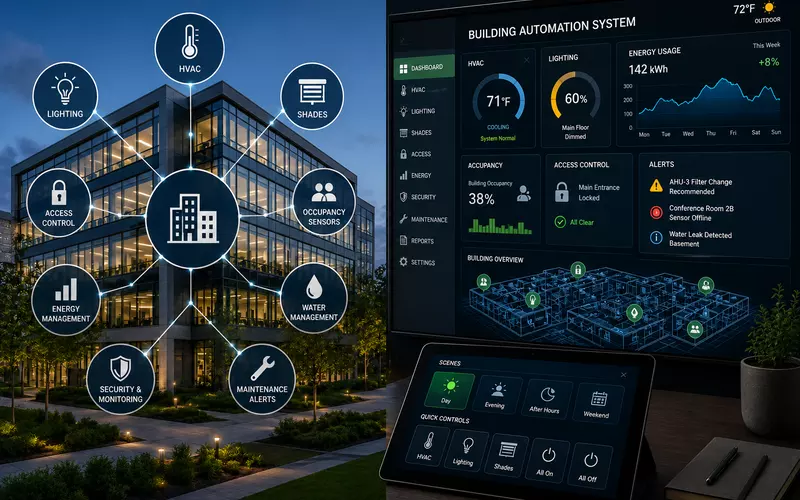
Modern buildings contain many independent systems that affect comfort, safety, energy use, and daily operations. When these systems use separate interfaces, schedules, and service processes, information becomes fragmented and problems are often discovered late.
Building automation connects those systems so they can exchange information, respond to changing conditions, and be managed through coordinated workflows. The goal is not automation for its own sake. A good system makes the property more comfortable, efficient, understandable, secure, and maintainable.
What Is Building Automation?
Building automation is the coordinated control and monitoring of mechanical, electrical, environmental, security, and technology systems. It may connect HVAC, lighting, shades, occupancy and daylight sensors, access control, energy meters, indoor-air-quality sensors, pumps, motors, water systems, surveillance, AV, elevators, and fault monitoring.
Sensors provide data, programmed logic evaluates it, and controllers send commands. When a meeting room becomes occupied, for example, the system might adjust temperature, turn on lights, set shades, update availability, activate presentation equipment, and begin tracking energy use. When the room is vacant, it can return to an energy-saving state.
More than a central control screen
A unified interface is useful, but coordinated logic and shared information create the deeper value. Occupancy can influence lighting and HVAC; access events can trigger after-hours modes; daylight can reduce electric lighting; meters can expose abnormal consumption; and equipment faults can generate service notifications.
The Main Components
Sensors
Temperature, humidity, carbon dioxide, air quality, occupancy, motion, daylight, water, pressure, equipment-status, and energy sensors describe conditions in the building. Automated decisions are only as dependable as these measurements.
Controllers
Controllers operate HVAC zones, lighting circuits, shades, pumps, fans, dampers, valves, doors, and other equipment. Critical decisions can happen locally so essential functions continue if a central server or network becomes unavailable.
Networks and protocols
BACnet, Modbus, KNX, DALI, SCADA-related protocols, manufacturer interfaces, and IP APIs let devices exchange information. Multiple protocols often coexist, making gateway and integration planning essential.
Management software
The management layer presents equipment status, floor plans, temperatures, schedules, alarms, trends, energy data, controls, and reports. Views should be organized by role so operators see useful information without unnecessary complexity.
Coordinating Building Systems
HVAC automation
HVAC is often the largest energy consumer. Automation can coordinate schedules, setpoints, ventilation, equipment staging, variable-speed fans, dampers, valves, seasonal modes, after-hours requests, and air-quality readings. Instead of conditioning every space equally, the building can prepare rooms shortly before use.
Lighting, daylight, and shades
Occupancy control, schedules, daylight harvesting, dimming, scenes, exterior schedules, and after-hours shutoff reduce waste while supporting occupants. Shades can respond to solar position, exterior brightness, occupancy, temperature, and presentation modes to manage glare and heat gain.
Access control and security
Authorized entry can activate lights and occupied HVAC modes; arming can initiate after-hours behavior; emergency rules can release designated doors. Life-safety and security functions may need independent operation even while sharing information with the broader platform.
Energy monitoring
Whole-building, floor, tenant, mechanical, lighting, data-room, renewable-energy, water, and gas data can expose after-hours use, continuously running equipment, peak demand, inefficient schedules, and performance changes. Monitoring produces value only when teams use it to improve decisions.
Fault Detection, Occupancy, and Centralized Monitoring
Automation can notify the right people when temperatures exceed limits, equipment stops responding, components need service, fans operate outside expected ranges, water is detected, energy becomes abnormal, or devices go offline. Alarms should be prioritized and actionable; excessive low-value alerts lead to alarm fatigue.
Motion and presence sensors, booking systems, access events, people counting, video analytics, and workplace platforms can inform lighting, temperature, ventilation, room status, cleaning, and energy strategies. Designs should collect only the occupancy information needed for the operational purpose.
Central dashboards can show active alarms, equipment health, room conditions, energy, access activity, maintenance indicators, and communication failures across large properties. Local controls still matter: occupants may need approved temperature, lighting, shade, scene, and after-hours adjustments.
Open Protocols, Proprietary Systems, and Integration
Widely adopted protocols can improve multi-vendor integration, service options, and expansion. Proprietary ecosystems may simplify configuration and enable advanced manufacturer-specific functions. Many properties use both. The right strategy supports the owner's lifecycle goals rather than pursuing “open” or “closed” as an end in itself.
- BACnet is widely used for HVAC and broader building control, with standardized building data.
- Modbus commonly connects meters, power equipment, controllers, and industrial devices.
- KNX coordinates lighting, shading, HVAC, sensors, and room control in residential and commercial properties.
- DALI provides digital lighting addressing, grouping, dimming, scenes, and status.
Using the same protocol does not guarantee identical capabilities. The design must define gateways, exposed data points, and which platform owns each decision.
Avoid duplicate control logic
A lighting processor, building-management system, occupancy platform, and scheduling application should not all own the same schedule. Documentation should identify the system of record, schedule source, owner of each sequence, alarm generator, and historical-data repository.
Network Infrastructure, Cybersecurity, and Resilience
IP networks may carry controller communication, management, updates, trends, video, security information, remote access, and APIs. Planning should cover segmentation, switching, redundancy, PoE, address management, documentation, backups, and recovery. Building controls should never be added casually to an unmanaged office network.
Security requires firewalls, strong authentication, role-based permissions, encrypted remote access, controlled vendor access, update management, logging, regular backups, and offboarding procedures. Default passwords and permanently open connections should be avoided.
Essential functions should continue if a cloud service or connection fails. HVAC controllers should maintain safe conditions, lighting should remain usable locally, access systems should follow offline rules, alarms should retain history, and essential schedules should not depend solely on the internet.
Integration with AV and Room Control
A conference-room mode might turn on displays, set lighting, close shades, adjust temperature, activate conferencing equipment, and update room status. In a residence, Away could turn off lights, adjust HVAC, lower shades, secure doors, stop entertainment, and activate monitoring. Useful integration follows real workflows and remains maintainable.
New Construction Versus Retrofit Projects
New construction
Early involvement makes it possible to coordinate cabling, electrical panels, mechanical controls, sensors, equipment rooms, networks, lighting, access, and expansion before construction documents are final.
Existing buildings
Retrofits may reuse wiring, add networked or wireless devices, connect older equipment through gateways, replace obsolete controllers in phases, and minimize disruption. A site survey is critical because old documentation is often incomplete.
Future-ready design includes spare network capacity, controller inputs and outputs, accessible pathways, standardized naming, expandable licenses, modular panels, documented APIs, rack space, and configuration backups.
Documentation, Commissioning, Training, and Support
A complete handover includes system architecture, network diagrams, device lists, controller locations, wiring, point schedules, sequences of operation, permissions, alarm descriptions, programming records, backups, manuals, and service contacts. Records must change when the system changes.
Commissioning verifies sensors, outputs, schedules, alarms, graphics, integrations, offline behavior, energy sequences, permissions, and recovery conditions. It should test complete workflows—not merely confirm that devices appear online.
Facility teams need training in alarms, schedules, trends, overrides, users, backups, and troubleshooting. Occupants may need only simple local-control guidance. Long-term service should address updates, calibration, controllers, network health, alarms, accounts, integration tests, replacements, and documentation.
Common Building-Automation Mistakes
- Selecting platforms before defining operational requirements
- Integrating systems without clear control ownership or gateway strategy
- Relying on undocumented custom programming
- Ignoring network security, local fallbacks, or cloud dependencies
- Installing inaccurate or poorly positioned sensors
- Generating too many low-value alarms
- Failing to involve facility and IT teams
- Skipping commissioning, training, and documentation updates
- Ignoring software, licensing, and long-term support costs
A properly designed system improves comfort, energy use, fault response, security workflows, operational visibility, equipment life, and adaptability—not by adding more devices, but by giving each system a clear role.
Working with an Integration Partner
Building automation crosses architecture, mechanical and electrical engineering, lighting, security, IT, construction, facilities, and equipment manufacturing. The integrator defines system boundaries, communications, workflows, control logic, testing, and service expectations so the system remains understandable after the original project team leaves.
Explore AVgator's building-automation services and supported technologies including BACnet, KNX, DALI, and Modbus.
Frequently Asked Questions
What is the difference between building automation and a building-management system?
The terms are often used interchangeably. Building automation generally refers to connected controls and field devices, while a building-management system often refers to the broader software used to monitor and manage them.
What systems can building automation control?
It can control or monitor HVAC, lighting, shades, energy meters, access control, pumps, fans, water systems, air-quality sensors, security, AV equipment, and other connected infrastructure.
Is building automation only for large commercial buildings?
No. It can serve offices, schools, healthcare facilities, hotels, retail and industrial buildings, apartment properties, luxury residences, and mixed-use developments.
Does building automation save energy?
It can reduce energy use through better schedules, occupancy response, coordinated lighting and HVAC, and detection of inefficient equipment behavior. Results depend on the building, strategy, commissioning, and ongoing operation.
Can older equipment connect to a modern automation system?
Often, yes. Existing equipment may connect through compatible controllers, gateways, input/output modules, or protocol converters, depending on its condition and available interfaces.
What is BACnet?
BACnet is a communication protocol developed for building automation. It allows controllers and equipment from different manufacturers to exchange building-related data.
What is the difference between BACnet and Modbus?
BACnet is designed for building systems and defines standardized building objects and services. Modbus is a simpler industrial protocol often used with meters, power equipment, controllers, and machinery.
What is KNX used for?
KNX integrates lighting, shading, HVAC, sensors, room controls, and other building functions in residential and commercial properties.
What is DALI used for?
DALI is a digital lighting-control protocol that allows fixtures and drivers to be addressed, dimmed, grouped, monitored, and included in scenes.
Can different automation brands work together?
Yes, when compatible protocols or APIs exist or an appropriate gateway is available. Sharing a protocol does not guarantee identical capabilities, so integration points must still be reviewed.
Does building automation require internet access?
Not necessarily. Core functions can and often should operate locally. Internet access may support remote service, cloud analytics, updates, and off-site monitoring.
What happens if the network fails?
A properly designed system maintains essential local functions. Controllers can continue schedules and control sequences while centralized monitoring or remote access is unavailable.
Is building automation secure?
It can be when designed and maintained correctly, using segmentation, strong authentication, controlled remote access, firmware management, backups, logging, and regular access reviews.
Can building automation control conference rooms?
Yes. Shared room modes can coordinate displays, lighting, shades, HVAC, occupancy, scheduling, and conferencing equipment.
Can occupants still control their rooms?
Yes. Local thermostats, lighting and shade controls, and touch interfaces can allow approved adjustments while the central system maintains the overall strategy.
When should building-automation planning begin?
During early architectural and engineering phases, when sensors, cabling, panels, networks, mechanical equipment, electrical systems, and interfaces can be coordinated.
Can building automation be added to an existing property?
Yes. Retrofits can use new controllers, gateways, selective rewiring, networked devices, and phased replacement of outdated equipment.
How long does a building-automation system last?
Controllers and field devices may serve for many years, while software, servers, networks, and integrations may require earlier updates. Lifecycle and upgrade planning are essential.
Who maintains a building-automation system?
Facility staff, the automation integrator, IT teams, mechanical contractors, and manufacturers may share responsibility. The service plan should define ownership clearly.
What documentation should the building owner receive?
The owner should receive system diagrams, device lists, point schedules, sequences of operation, wiring and network details, backups, credentials, alarm descriptions, manuals, and service contacts.
Building Automation That Serves Daily Operations
Building automation connects the systems that determine how a property feels, operates, consumes energy, and responds to problems. Successful projects begin with clear goals, defined control responsibility, reliable infrastructure, secure networks, thorough commissioning, and a realistic service plan.
AVgator designs and integrates building automation, control, networking, AV, lighting, and monitoring systems for residential and commercial properties in Charlotte and beyond. Schedule a project consultation.